Caution
Refrigerator service tests should only be used for testing. Test mode procedures should be used only by qualified service technicians and are not intended to be used by customers. Do not use these tests other than specified.
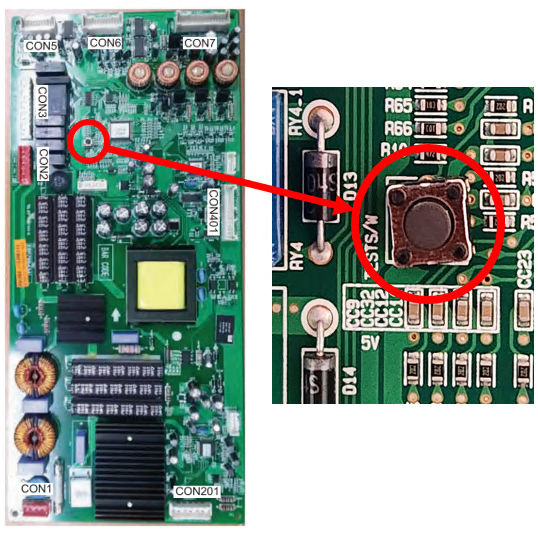
To enter Test Mode on Refrigerators, locate the small test button located on the Main PCB and press the button. There will be an audible beep when the unit enters test mode and you will see the display change. To advance to the next step press the test button again and you will hear another audible sound and the display will change to let you know what step you are currently running. When finished the display will show normal temperatures again.
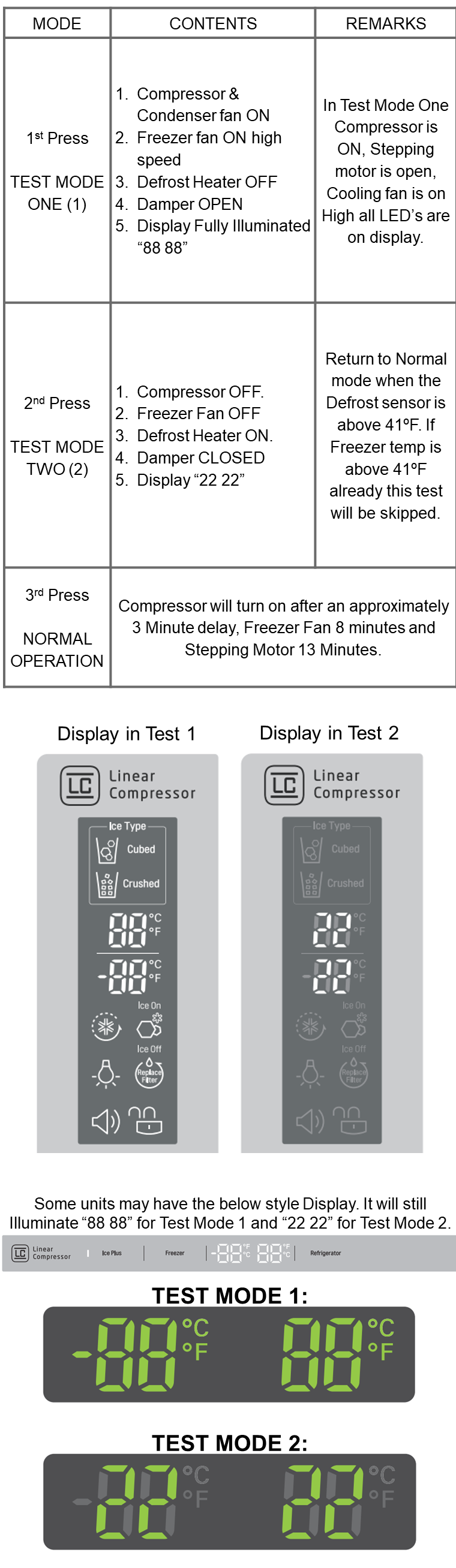
Special Notes for Refrigerator Test Mode:
1. If the unit is too warm inside the Defrost portion of test mode will be skipped. On some models the threshold is 41°F and others can be up to 55°F.
2. Some models will not enter test mode if there is a component unplugged, such as a fan motor for example. If you press the test button on the Main PCB and get no audible beep or change in the display check to make sure everything is plugged in and look for hidden error codes. (The most common method to pull hidden error codes is to hold Freezer and Ice Plus for 3-5 Seconds)
3. At the completion of test mode there could be a delay in the compressor and other functions starting back up. Depending on model it could take from 3-15 minutes in some cases.